
In a Nutshell
You might be browsing the web when a loud siren sounds and a window freezes your screen, claiming your "Apple ID is locked" due to illegal activity. These criminals rely on your panic to drive you straight into the arms of a fake "Apple Support" agent.
Apple maintains a very strict communication policy to protect your data. The official apple support phone number for the U.S. is 1-800-275-2273 (1-800-APL-CARE). If you receive a call from any other number claiming to be Apple, hang up immediately.
Scammers use "spoofing" technology to make your caller ID display "Apple Inc." or a local area code. You cannot trust your screen; you can only trust the official channels you initiate yourself. If you are unsure about a caller's identity, use the ScamAdviser phone checker tool to see if the number has been flagged by other users.
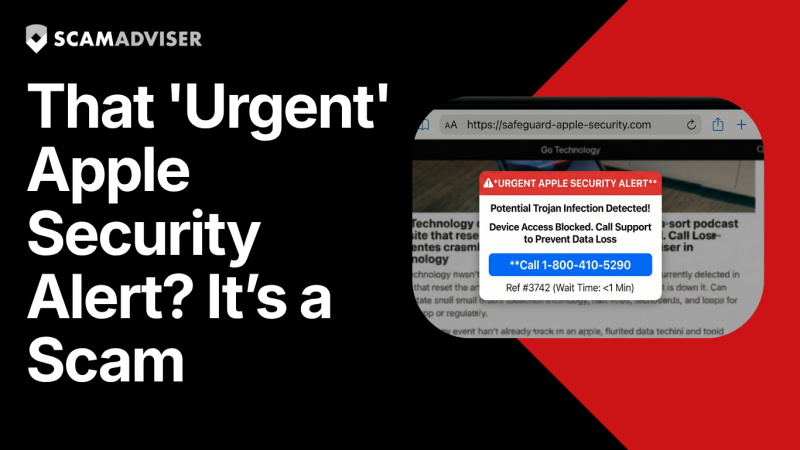
An apple pop up scam typically appears while you are visiting a compromised or low-quality website. These alerts use alarming language like "Critical Security Breach" or "Pornographic Spyware Alert" to bypass your logic. The popup is designed to prevent you from closing the browser tab, making it feel like your computer is actually locked.
Apple’s actual security alerts are built into the macOS or iOS operating system, not your web browser. A real alert will never include a phone number or a link to a third-party chat service. If you see a number on a popup, it is a 100% guarantee that you are looking at an apple security alert scam.
The apple support number scam often starts with a "vishing" (voice phishing) attack. You may receive an automated recording stating that there is "suspicious activity on your iCloud account" or that your "Apple ID has been compromised." The recording will then urge you to "press 1" to speak with a technician.
Apple’s official policy is clear: "Apple will never call you unsolicited." Unless you have requested a callback through the official Apple Support website, any incoming call from "Apple" is a fraud. These scammers want to gain remote access to your device using software like AnyDesk or TeamViewer to steal your banking information.
An apple id locked scam often arrives via email with a sense of extreme urgency. The message might say "Your account will be deleted in 24 hours" unless you click a link to verify your identity. These emails often use the official Apple logo, but the "From" address usually reveals a random, non-Apple domain.
Always hover your mouse over any link before clicking to see the actual destination URL. If the link leads to a string of random characters or a domain like "apple-security-check.com" instead of "apple.com," it is a phishing attempt. If you have already clicked a link, do not enter your credentials; close the window and go directly to the official Apple ID website to check your status.
Cybercriminals use psychological pressure to make you feel like you have "limited spots" for protection or "guaranteed fixes" for a fee. They may claim that your "IP address is being used for criminal activity" to scare you into compliance. This "authority" is entirely fabricated to make you hand over your credit card details.
Legitimate tech support scam apple cases often end with a request for payment via untraceable methods. If an agent asks you to buy App Store gift cards to "pay for a security license," you are being robbed. No legitimate corporation, especially not Apple, will ever ask for payment in the form of retail gift cards or Bitcoin.
If you gave a scammer remote access to your Mac or iPhone, disconnect your internet immediately. This cuts their connection and prevents further data exfiltration. You should then change your Apple ID password and enable Two-Factor Authentication (2FA) if you haven't already.
If you provided credit card information, call your bank's fraud department to cancel the card. They can help you dispute any "service fees" the scammers may have charged. Run a full system scan with reputable antivirus software to ensure the "technician" did not leave any persistence tools or malware on your device.
Reporting helps security researchers track the 1-800 apple support real patterns and shut down fake call centers. Forward any phishing emails you receive directly to reportphishing@apple.com. This allows Apple’s security team to blacklist the domains used in the attack.
You should also file a report with the Federal Trade Commission (FTC) at ReportFraud.ftc.gov. If you lost money, file a complaint with the FBI’s IC3. Your report might be the missing piece of evidence needed to dismantle a global scam network.
Apple will never reach out to you first to fix a problem you didn't know you had.
Adam Collins is a cybersecurity researcher at ScamAdviser who operates under a pseudonym for privacy and security. With over four years on the digital frontlines and 1,500+ days spent deconstructing thousands of fraud schemes, he specialises in translating complex threats into actionable advice. His mission: exposing red flags so you can navigate the web with confidence
