
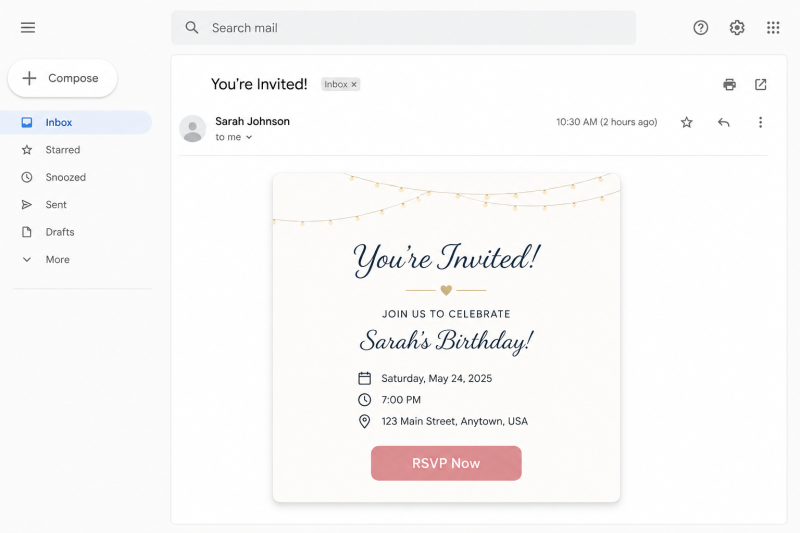
That surprise party invitation in your inbox might not be from a friend. Scammers are impersonating popular invitation services to steal passwords, personal information, and even infect devices with malware.
In a Nutshell
A growing scam is targeting people through the invitation platforms they already trust, including Paperless Post, Evite, and Punchbowl. Journalist Vicky Nguyen covered the trend, and the pattern she describes is worth understanding before the next "invite" lands in your inbox.
Scammers send an email or text designed to look like an RSVP request for a birthday party, career celebration, or similar event. The message copies the branding of a real invitation platform closely enough to pass a quick glance. The goal is either to steal your personal information or to get you to install malware on your device.
The message usually pushes you toward one of two actions: entering your email login to "view the invitation," or downloading a file or app to see the event details. Neither of those steps is something a real invitation ever requires.
Don't rush. If an invitation arrives unexpectedly, pause before clicking anything. Scam messages rely on quick, automatic reactions.
Check who sent it. Look at whether the invite comes from someone you actually know. A message from a generic personal email address, like a random Gmail or Yahoo account, rather than the person's usual contact, is a warning sign, especially if the tone feels out of character.
Hover over links before clicking. Rest your cursor on any link in the message and check where it actually leads. It should point to an official domain such as paperlesspost.com, evite.com, or punchbowl.com. If the link leads somewhere else entirely, do not click it.
Never log in through the invitation. A real invite will never ask you to enter your email password or download software just to view party details. That request alone is enough to confirm it is a scam.
Notice vague details. Genuine invitations usually include specifics, like the host's name, the occasion, and location details. A message that feels generic or short on detail is a sign something is off.
If you clicked a suspicious link or entered your credentials, act quickly.
Change your email password right away. Use a long, complex password, ideally 10 to 12 characters, mixing letters, numbers, and symbols. Avoid reusing a password from another account.
Turn on two factor authentication for your email and any other accounts that support it. This adds a second layer of protection so a stolen password alone cannot be used to get in.
If you notice unfamiliar activity on your accounts afterward, such as password reset emails you did not request or new devices logged in, treat that as a sign your information may have been compromised further and consider a broader password reset across your accounts.
Scammers rely on convincing fake websites to steal your passwords or install malware. Before clicking an invitation link or entering your login details, take a few seconds to verify the website with ScamAdviser.
If an invitation looks suspicious, copy the website address and paste it into ScamAdviser's Website Checker. You'll instantly see:
If the website has a low Trust Score or multiple warning signs, avoid entering any personal information.
The ScamAdviser App helps you stay one step ahead of scammers wherever you browse.
Whether you're opening a party invitation, shopping online, or responding to an unexpected message, having the ScamAdviser App makes it easier to spot scams before they catch you off guard.
Pro Tip: If you receive an unexpected invitation from Paperless Post, Evite, Punchbowl, or any other service, don't click the link immediately. Verify the website with ScamAdviser first, or open the invitation platform directly from your browser instead of using the link in the email or text.
See interesting articles from ScamAdviser:
Frequently Asked Questions
How do I know if a party invitation email is fake?
Check the sender's address, hover over any links to confirm they lead to the real platform's domain, and be suspicious of any invitation that asks you to log in or download something. Genuine invites do not require either.
What platforms are being impersonated in this scam?
Paperless Post, Evite, and Punchbowl have all been used as cover for these fake invitation messages, since scammers copy their look to appear legitimate.
What should I do immediately if I clicked a fake invitation link?
Change your email password to a strong new one right away and turn on two factor authentication. Watch your accounts closely for any unusual activity afterward.
Why do scammers use fake party invitations instead of other phishing methods?
Invitations feel personal and low risk, which makes people more likely to click without thinking. That reaction is exactly what the scam depends on.
Adam Collins is a cybersecurity researcher at ScamAdviser who operates under a pseudonym for privacy and security. With over four years on the digital frontlines, he specialises in translating complex threats into actionable advice. His mission: exposing red flags so you can navigate the web with confidence.
