A friendly invitation to a summer party or alumni event is now one of the most effective ways criminals hijack your email and drain your bank account. Attackers know you are suspicious of random security alerts from your bank, but expect emails from trusted friends. They exploit this social trust to lower your guard so you click a link and hand over your credentials.
Key Takeaways
- Attackers spoof digital invitation platforms to trick you into entering your email password or downloading malicious software.
- A single compromised email account allows scammers to bypass financial security checks and spread fraud to your entire contact list.
- Never enter your email password to view a digital card or event invitation.
- Dedicated safety checkers can analyze suspicious links before you click to verify if they point to genuine platforms.
The Scale of the Problem
According to data from the Federal Bureau of Investigation (FBI) Internet Crime Complaint Center (IC3), phishing and spoofing consistently rank among the most frequently reported cybercrimes. These attacks lead directly to unauthorized account access that fuels broader financial fraud.
Consumer warnings from the Federal Trade Commission (FTC) highlight that scammers regularly impersonate popular invitation services like Evite and Paperless Post to hijack personal email accounts. Beyond financial loss, this constant barrage takes a heavy personal toll, with cybersecurity research from organizations like McAfee showing that consumers lose significant productive time every week simply identifying and filtering out fraudulent messages.
Why Invitation Scams Are a Unique Threat
Most phishing attempts rely on fear or urgency, claiming your account is locked or a package is delayed. A fake digital invitation relies on positive social obligation. When you receive an email appearing to come from a recognized contact, your immediate reaction is curiosity and warmth.
The scammer exploits this reaction to direct you to a disguised login page. Once you enter your credentials, they gain master access to your digital identity.
Why this matters: A compromised email account gives attackers the power to reset your banking passwords, intercept two-factor authentication codes, and drain connected accounts.
How Digital Invitation Scams Work
The attack cycle follows a predictable technical path:
- Initial Compromise: The attacker gains access to a single user's email account.
- Contact Scraping: They extract the account's address book to target known connections.
- Mass Distribution: They send emails disguised as popular invitation platforms with generic subject lines like "You are invited!" or "Special Celebration."
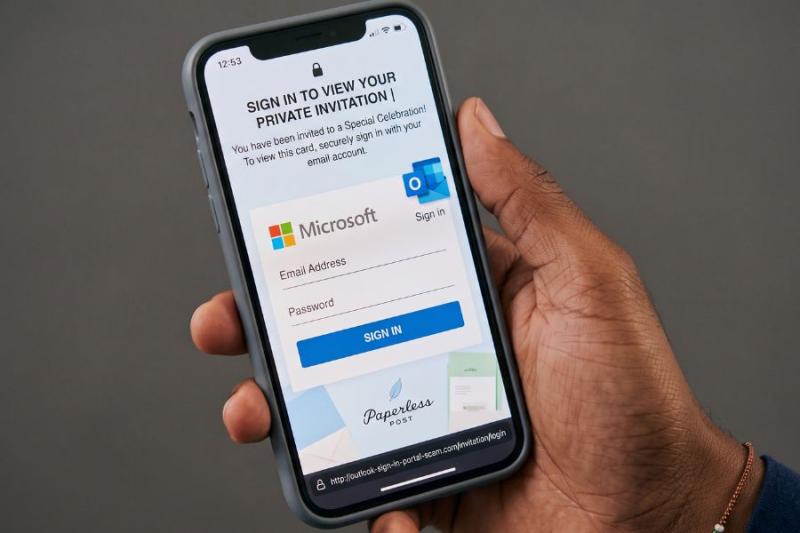
- Credential Harvesting: The "View Card" link directs you to a spoofed Google, Microsoft, or Yahoo sign-in page, claiming you must log in to view the private invite.
- Account Hijacking & Persistence: Once captured, the scammer logs into your real inbox, sets up hidden email forwarding rules to intercept sensitive communications, and replicates the attack across your contact list.
Credential Harvesting vs. Malware Payloads
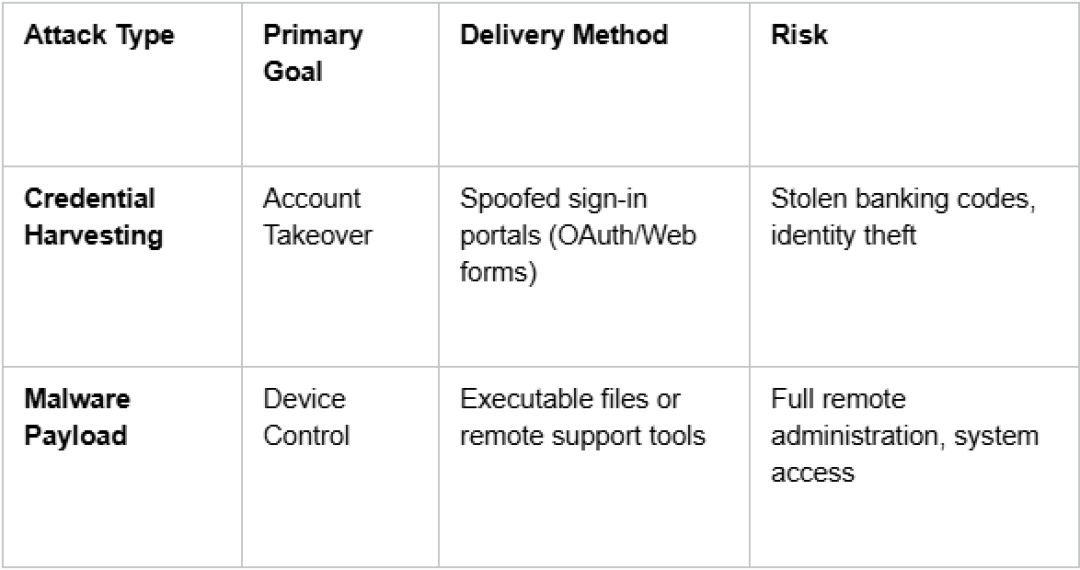
While password theft is the primary goal, some invitation scams deliver malware.
In malware-focused campaigns, clicking the invite link prompts you to download a file or install a program (such as repurposed remote administration software) under the guise of playing an animated greeting card or updating a viewer plugin.
Real-World Attack Scenarios
- Direct Account Hijacking & Financial Fraud: A victim receives a party invite from a friend's real address, clicks through, and enters their email password. Attackers immediately log in, monitor the inbox for banking communications, and intercept one-time security passcodes to process unauthorized transfers.
- Repurposed Remote Administration Tools: In documented campus and corporate phishing campaigns, fraudulent event invites do not ask for a password. Instead, they prompt the user to download remote software like ScreenConnect or AnyDesk to view event details, giving attackers full desktop access that bypasses standard antivirus detection.
- Gift Card & E-Commerce Drain: Upon capturing account access, automated bots or human attackers quickly scan stored receipts, reset connected retail passwords (such as Amazon or eBay), and purchase digital gift cards before the victim notices the unauthorized session.
- Automated Contact Chain Reactions: Once a single user falls for a fake login page, their inbox immediately sends identical malicious invites to hundreds of contacts, exploiting established trust to exponentially multiply the attack.
Identifying Legitimate vs. Fake Invitations
Before entering details or interacting with an invite, evaluate the message against these key red flags:
- Forced Logins: The link demands your email username and password just to view an event summary.
- Suspicious File Downloads: The message asks you to download an attachment or installer to open a card.
- URL Mismatches: Hovering over the link reveals a domain that does not belong to the official service (e.g., missing official domains like paperlesspost.com or pp.events).
- Context Disconnects: The sender is someone you know, but the event details, location, or timing make no sense for your relationship.
- Vague Details: The invite lacks specific information regarding the host, venue, or occasion.
Step-by-Step Security Checklist
If you receive a digital invitation that raises suspicion, follow this verification workflow:
- Do not click the link: Avoid interacting with buttons embedded inside the message.
- Verify out-of-band: Text or call the host directly via a known phone number to confirm they sent an invite.
- Inspect the destination: Hover over the button to view the actual URL without clicking it.
- Run a safety check: Copy the link address and analyze it using established domain verification tools (such as ScamAdviser or VirusTotal) to check domain age and trust scores.
- Check active account sessions: Regularly review your email provider’s active login sessions and revoke access for any unfamiliar devices or locations.
Protecting your digital footprint starts with treating unexpected login prompts as immediate red flags. A genuine host will never require you to hand over your email credentials just to RSVP to a party.
See More interesting articles from ScamAdviser:
Adam Collins is a cybersecurity researcher at ScamAdviser who operates under a pseudonym for privacy and security. With over four years on the digital frontlines, he specialises in translating complex threats into actionable advice. His mission: exposing red flags so you can navigate the web with confidence.
See Full Bio