
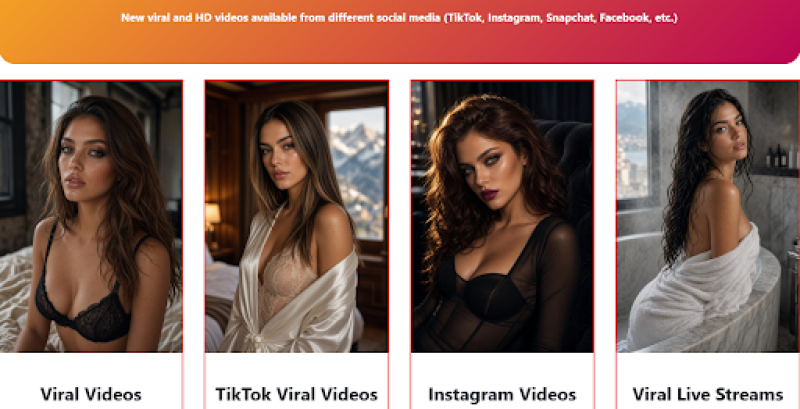
Sites branded as "Viral Clips and Leaks" are not video platforms. They are traffic funnels built to turn curiosity into clicks, redirects, ad views, and in some cases malware or unwanted subscriptions.
The video is the bait. The redirect chain that follows the "watch now" button is the product.
If you want to verify a suspicious domain before interacting with it, start with Scamadviser’s website trust checker to see whether the technical signals match the marketing promise.
The pitch is usually the same: leaked videos, private clips, viral content you supposedly cannot find anywhere else. The page pushes urgency with claims like:
That language is designed to trigger impulse, not inform. The promise is not really access to video, it is a click.
Even if the redirect chain were completely clean, the content model itself would still be a problem. This is the part that a technical trust score cannot measure.
Material marketed as "leaked" or "private" almost always means it was recorded or shared without the knowledge or consent of the person in it. That is not an edge case or a gray area. It describes the entire value proposition of these sites. The word "leaked" in the headline is not a content category. It is an admission that the footage was obtained without permission.
In most countries, distributing intimate images or video without the subject's consent is a criminal offense, separate from any copyright or piracy questions. Laws covering non-consensual intimate image sharing (sometimes called "revenge porn" laws) exist across the US, UK, EU, Australia, and dozens of other jurisdictions. Penalties range from civil damages to criminal prosecution, and in some cases they apply not just to the distributor but to platforms that knowingly host the material.
A site can score well on technical safety checks and still be built entirely around this kind of harm. The ScamAdviser review of Zira9.com, a site operating on the same model, makes this point directly: a decent trust score does not change the ethical or legal status of content that people did not agree to share.
The harm from non-consensual content does not stop at the person in the video. Browsing and engaging with this material creates demand that funds the distribution network. Every page view generates ad revenue. That revenue pays for more domains, more redirect infrastructure, and more sourcing of content that real people did not consent to share.
The trust score does not measure this. A site can pass every technical check and still cause direct harm to real people. Ethical risk and technical risk are not the same thing, and "Viral Clips and Leaks" sites routinely score fine on one while failing completely on the other.
You click expecting a video player. What loads instead is a redirect chain, a sequence of intermediate pages engineered to extract value from your attention before you ever reach any content, if you reach it at all.
The video is rarely the destination. It is the excuse to start the chain.
Most of these sites follow a predictable pattern. Understanding each stage helps you recognize when you are inside one.
Each hop generates revenue for the operator. The video, if it exists at all, is incidental. As ScamAdviser's analysis of similar redirect-driven platforms like Duavn.net shows, you do not even need to download anything intentionally for this chain to cause harm. Simply interacting with a fake "close" button can trigger an unwanted script.
Key point: On these sites, every clickable element, including the play button, the close button, and the age verification checkbox, is a potential redirect trigger. The interface is not built for video. It is built for clicks.
The outcome depends on which version of the redirect chain you land in. Some are annoying. Others are genuinely damaging. None of them are neutral.
Granting notification permission is the most common trap because it looks harmless. You click "Allow" and nothing obvious happens. Then, hours or days later, your browser starts pushing alerts: explicit content, fake virus warnings, gambling ads, and "you have a message" notifications designed to look like they came from a real app.
These alerts continue even after you close the browser tab and persist until you manually revoke the permission in your browser settings. Operators sell access to these notification channels to ad networks, meaning a single "Allow" click can generate revenue for months.
To revoke unwanted notification permissions: Go to your browser settings, search "Notifications," and remove any unrecognized URLs from the allowed list.
Downloading a file labeled as a "player," "codec," or "cleaner" is where serious damage begins. These files are delivery mechanisms. What arrives on your device is not what the label says.
The most common payloads from these redirects include:
None of these arrive labeled as malware. They arrive labeled as the thing you were told you needed to watch the video. That is the entire point of the framing.
ScamAdviser's breakdown of how malvertising works explains the mechanics behind these delivery chains: malicious ad networks use forced redirects to push fake virus alerts and tech support scams, and you do not need to download anything intentionally for some of these scripts to execute. A click on a fake "close" button is enough.
The real risk calculation: The question is not whether a specific "Viral Clips and Leaks" domain is technically flagged. It is whether the redirect chain it feeds into has been weaponized. That changes daily, and no trust score tracks it in real time.
If someone is threatening to release private images or video of you, searching these sites is not the move. The steps that actually help are straightforward, but they require acting quickly and in the right order.
Do not pay. Payment confirms you will pay again. The demands rarely stop after the first transfer; they typically escalate. Most sextortion operators are running volume-based schemes and will move on if they do not get a fast response.
Stop responding entirely. Every reply, including "please stop" or "I know it is fake," gives the person making the threat more material to work with and confirms the account is active. Block them on every platform and go silent.
Save everything before you block. Screenshot the messages, usernames, profile links, and any images sent to you. This becomes evidence. Do it before blocking, not after.
StopNCII.org is worth highlighting specifically. It lets you create a digital fingerprint of an image that participating platforms use to block it from being uploaded, without you having to send the image to any public site. It works without requiring you to share the content itself.
If Deepfakes Are Involved
Sextortion increasingly involves fabricated content, not just real footage. The FBI has warned publicly about malicious actors using AI tools to generate explicit imagery from ordinary photos pulled from social media. ScamAdviser has covered this pattern in detail in its guide to deepfake scams and sextortion schemes. The same reporting steps apply regardless of whether the content is real or generated.
For a full walkthrough of your options, ScamAdviser's guide on how to deal with sextortion and stop nudes from being shared covers each step in plain language.
Most of the warning signs appear before you ever click play. The pattern is consistent enough across these sites that recognizing even two or three of the following signals is enough to close the tab.
Clicking play takes you somewhere other than a video player. Even a brief redirect before the video loads is a strong signal. On a legitimate platform, clicking play loads the player. On a redirect funnel, clicking play is the trigger.
You are asked to allow notifications before anything loads. No video platform requires notification permission to play a video. This prompt has one purpose.
A pop-up claims your device is infected. Your browser cannot detect malware on your device. Any alert claiming otherwise is scareware. Close the tab using Task Manager (Windows: Ctrl + Shift + Esc) or Force Quit (Mac: Option + Command + Esc) rather than clicking anything on the page.
You are asked to download a file to watch the video. Legitimate streaming requires no download. If a site tells you otherwise, the file is the threat, not the solution.
If you encounter a link to an unfamiliar site and want to check it before clicking through, run the domain through ScamAdviser's website trust checker first. It checks domain age, hosting reputation, blacklist status, and user reports. A new domain with no history is itself a risk signal on these types of sites, since operators register fresh domains regularly to replace ones that get flagged.
For a broader guide on navigating redirect-heavy platforms safely, ScamAdviser's article on how to watch porn safely without viruses or scams covers the same redirect patterns in more depth.
Adam Collins is a cybersecurity researcher at ScamAdviser who operates under a pseudonym for privacy and security. With over four years on the digital frontlines, he specialises in translating complex threats into actionable advice. His mission: exposing red flags so you can navigate the web with confidence.
