
Walgreens Photo is a legitimate service that allows customers to print photos, create photo books, order calendars, and purchase other personalized photo products. However, scammers may misuse the Walgreens name to send fake text messages and emails designed to steal personal information, account passwords, or payment details.
These fraudulent messages may claim that your photo order is ready for pickup, that your payment has failed, or that you need to verify your account before receiving your order. They often include suspicious links that lead to fake websites designed to look like the official Walgreens website.
Understanding how these messages work can help you recognize warning signs and avoid losing money or exposing your personal information.
Scammers use different approaches to make their messages appear genuine. They may copy the Walgreens name, use its logo, or include familiar terms related to photo printing and order pickup.
Here are some common examples of how these phishing attempts work:
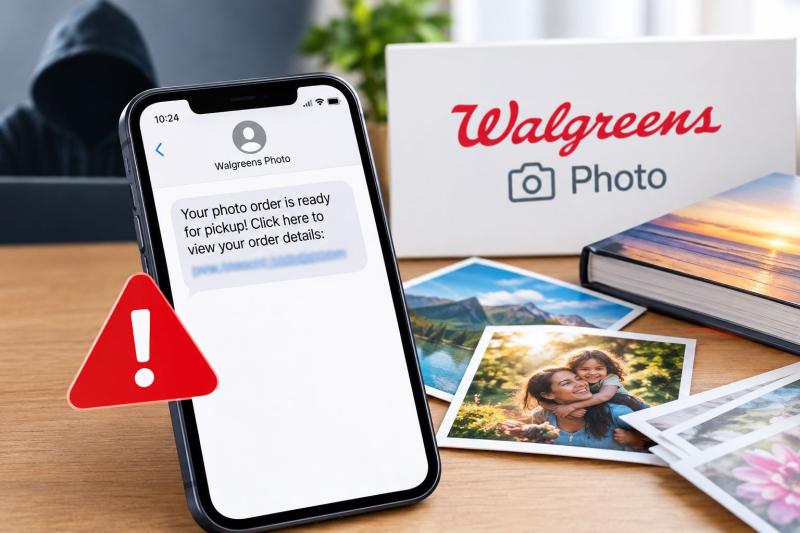
You may receive a text message or email claiming that your Walgreens Photo order is ready for collection. The message might include a link to view your order details, confirm the pickup location, or access your photos.
For example, you might receive a message like this:
"Walgreens Photo: Your photo order is ready for pickup! Click here to view your order details: [suspicious link]."
If you have not placed a photo order, this message should immediately raise concerns. The link may direct you to a fake website that asks for your Walgreens login information or payment details.
Even if you recently ordered photos, do not assume the message is genuine simply because it refers to a service you use. Verify the order through official Walgreens channels.
Another common method involves a message claiming that your photo order cannot be processed because your payment failed.
For example:
"Walgreens Photo: We could not process your recent order. Please update your payment information immediately to avoid cancellation."
The message may direct you to a website where you are asked to enter your credit card number, billing address, or account password. Scammers may use this information to make unauthorized purchases, access accounts, or attempt further fraud. A legitimate payment problem should be checked through your actual account rather than through an unexpected message link.
Some messages try to create panic by claiming that your photos will be deleted or your order will be canceled unless you take immediate action.
For example:
"Your Walgreens Photo order will be canceled within 24 hours. Verify your details now to keep your order active."
These warnings are designed to make you act quickly without checking whether the message is authentic. Be cautious whenever an unexpected message threatens to delete your photos, cancel an order, or impose a fee unless you click a link immediately.
You might also receive an email claiming that Walgreens has issued a refund or detected an unfamiliar transaction related to your photo order.
For example:
"An unusual payment was detected on your Walgreens account. Click below to review the transaction and secure your account."
The link may lead to a fake login page that collects your credentials or financial information. If you are concerned about an actual transaction, open the official Walgreens website or app independently and check your account. You can also review your bank or card statement using your bank's official app.
Some phishing emails claim that your digital photos, photo book, or completed order is available through an attached file or download link. The message may ask you to download an attachment, open a document, or sign in to view your pictures.
Unexpected attachments and download links can expose you to phishing pages or malicious files. Do not open them unless you have independently verified the sender and were expecting the content.
Although fraudulent messages can look convincing, several warning signs can help you identify them.
Unexpected order notifications:
If you have not ordered photos or uploaded images recently, an order confirmation or pickup notification deserves extra scrutiny. Thus, verify it independently.
Suspicious website addresses:
A message may use a domain such as walgreens-photo-order.net or another address that imitates the Walgreens name. Check the actual domain carefully rather than trusting a familiar looking brand name.
Urgent demands:
Messages that demand immediate payment, account verification, or action to prevent cancellation are common phishing tactics.
Requests for sensitive information:
Be suspicious of links asking you to provide your password, full payment card details, security codes, or other sensitive information to resolve an unexpected order issue.
Unfamiliar sender details:
A message may come from a random phone number, an unusual email address, or a sender name that appears legitimate but cannot be independently verified. Remember that sender information can sometimes be spoofed.
Poor spelling or unusual wording:
Some fraudulent messages contain grammatical mistakes, inconsistent formatting, or strange phrases.
Unexpected attachments:
An email containing an unfamiliar file or asking you to install something to view your photos should be treated with caution.
If you receive a message about a Walgreens Photo order, take a moment to verify it before clicking anything.
A padlock symbol or HTTPS connection does not guarantee that a website is legitimate. Fraudulent websites can also use encrypted connections.
The safest approach is to avoid interacting with the message until you have verified it.
You can also report suspected phishing to the appropriate consumer protection or cybercrime authority in your country.
Clicking a suspicious link does not automatically mean that your information has been stolen. However, you should take the situation seriously, especially if you entered details or downloaded a file.
If you only opened the link:
Close the page and do not enter any information. Check that your browser and device software are up to date. If you downloaded anything, opened a file, or noticed unusual device behavior, run a security scan using a trusted security tool.
If you entered your Walgreens password:
Change it immediately through the official website or app. If you use the same password on other accounts, change it there as well. Use unique passwords and enable multifactor authentication where available.
If you entered credit card or banking details:
Contact your bank or card issuer using its official phone number or app. Explain what happened and ask whether the card should be locked or replaced. Monitor transactions for unauthorized charges.
If you provided personal information:
Be alert for follow-up messages, identity theft attempts, or requests for additional verification codes. Never share a one-time security code with someone who contacts you unexpectedly.
If you installed a file or application:
Stop interacting with it, run a security scan, and seek trusted technical assistance if you suspect your device has been compromised.
Acting quickly can reduce the risk of further damage.
Walgreens Photo is a legitimate photo printing service offered by Walgreens. Customers can use it to order prints and personalized photo products through official Walgreens channels.
The important distinction is between the real service and messages sent by people pretending to represent it.
A genuine Walgreens Photo order notification should relate to an actual order or account activity. However, scammers may copy branding and order-related language to make fraudulent messages appear authentic.
Keep these points in mind:
You can reduce your risk by following a few simple security practices such as:
Walgreens Photo is a legitimate service, but its name can be misused by scammers who send fake text messages and emails. These messages may claim that a photo order is ready, a payment has failed, or your account requires immediate verification.
The main risk comes from clicking malicious links and sharing sensitive information with fraudulent websites. Always verify order details through the official Walgreens website or app, avoid unexpected attachments, and report suspicious messages.
If you have already shared your information, take action quickly by changing affected passwords, contacting your bank when necessary, and monitoring your accounts.
The information in this article is provided for educational and awareness purposes. Company names, phone numbers, sender names, and other details referenced may have been impersonated, spoofed, or otherwise misused by scammers. Their appearance in this article does not necessarily identify the legitimate company, owner of a phone number or account as being involved in fraudulent activity.
This article has been written by a Scam Fighter Contributor, De-Reviews.com Team. If you believe the article above contains inaccuracies or needs to include relevant information, please contact ScamAdviser.com using this form.
De-Reviews.com Team is a group of scam researchers, editors, and online safety advocates dedicated to exposing online fraud and helping consumers stay safe online. The team has been investigating scams, fraudulent websites, phishing campaigns, and other online threats since 2014. Read the Full Author Profile.
