
You sell something online, the buyer seems genuine, and then an email lands in your inbox saying your Zelle payment is “on hold” until you upgrade your account. In that moment, it feels stressful, confusing, and just believable enough to make people panic.
That’s exactly what scammers are counting on. These fake Zelle business account emails are designed to rush you into sending money before you realize there was never a payment in the first place.
In a Nutshell
Key Fraud Statistics
A Zelle business account scam happens when a fake buyer emails a seller claiming a payment is "on hold." The email insists the seller must pay a fee to upgrade to a business profile before the funds can be released. Zelle does not hold payments, charge upgrade fees, or require business profiles to release money. If you receive a message like this, it is a scam — full stop.
These scams prey on freelancers, marketplace sellers, and small businesses expecting payment. A buyer agrees to your price, you wait for the notification, then an email says your funds are locked until you pay a fee. You panic, send the money, and the buyer vanishes.
In July 2025, the New York Attorney General filed a lawsuit against Zelle citing total fraud losses exceeding $1 billion. Consumer complaints to the Consumer Financial Protection Bureau (CFPB) about Zelle fraud jumped 86% between 2022 and 2024, with reported losses topping $400 million annually. In Q1 2025 alone, victims lost $118.1 million on peer-to-peer payment platforms.
At ScamAdviser, we have uncovered several trending Zelle scams.
A buyer on Facebook Marketplace or Craigslist agrees to purchase your item and sends a payment confirmation screenshot. You then receive an email — styled to look like an official Zelle notification — stating your account needs a "business account upgrade" to accept the transaction. The email tells you to send between $200 and $500 to unlock the funds. You send the money, but the original payment never existed.
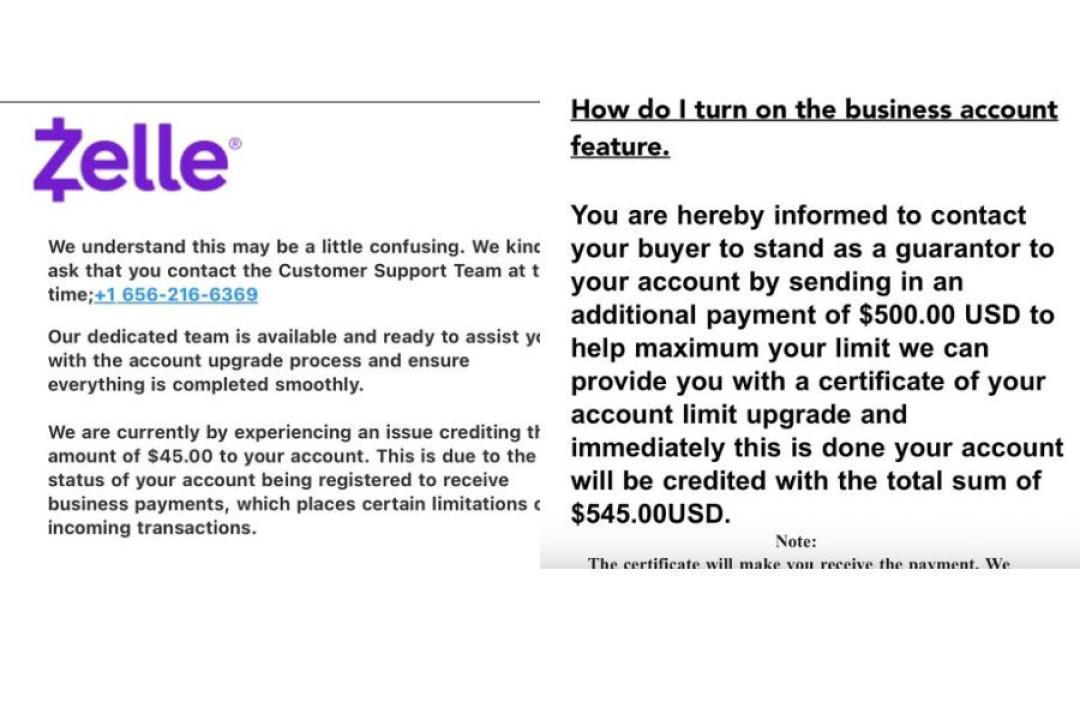
ScamAdviser Check: Paste the sender's email domain (e.g., zellepay-confirm.com) into ScamAdviser.com. Legitimate Zelle emails only come from @zelle.com. Fake domains will show a Trust Score near 1 and a registration age measured in days or weeks.
You receive a text or call from someone claiming to be your bank's fraud department. They say someone has compromised your account and instruct you to "reverse the fraudulent transaction" by sending money via Zelle to a "secure account." Real bank fraud teams never ask you to send money to resolve fraud. This exact tactic cost one victim $2,000 when she tried to "help investigate" her own account.
A buyer "accidentally" pays you too much and asks you to refund the difference. You send back the overpayment. Days later, the original transaction bounces. You lose your goods, your time, and the money you refunded. Zelle overpayment scams specifically target freelancers and gig workers who accept payment upfront.
Rule: Never refund an overpayment until you see the original funds cleared and available in your bank account — not just pending.
You receive an email from a brand you recognize — Amazon, PayPal, your bank — telling you to click a link to view an invoice or verify a charge. The link opens a fake login page that steals your banking credentials.
Because Zelle is built directly into most major bank apps, attackers can drain your accounts the moment they have your login..
A buyer insists on using Zelle and refuses all other payment methods. They send a fake payment confirmation screenshot, and you ship the goods before verifying the deposit in your actual bank app. The New York Attorney General specifically cited Facebook Marketplace Zelle scams as a primary driver of their July 2025 lawsuit.
Rule: Always verify funds by logging directly into your bank app — not by reading an email or screenshot.
This is a textbook, real-life example of how scammers combine a fake "payment hold" with a "business upgrade" trap to weaponize a victim's immediate panic and confusion.
The Real-Life Example
An actual phishing email received by a target on May 26, 2026, perfectly captures how this attack unfolds in the wild:
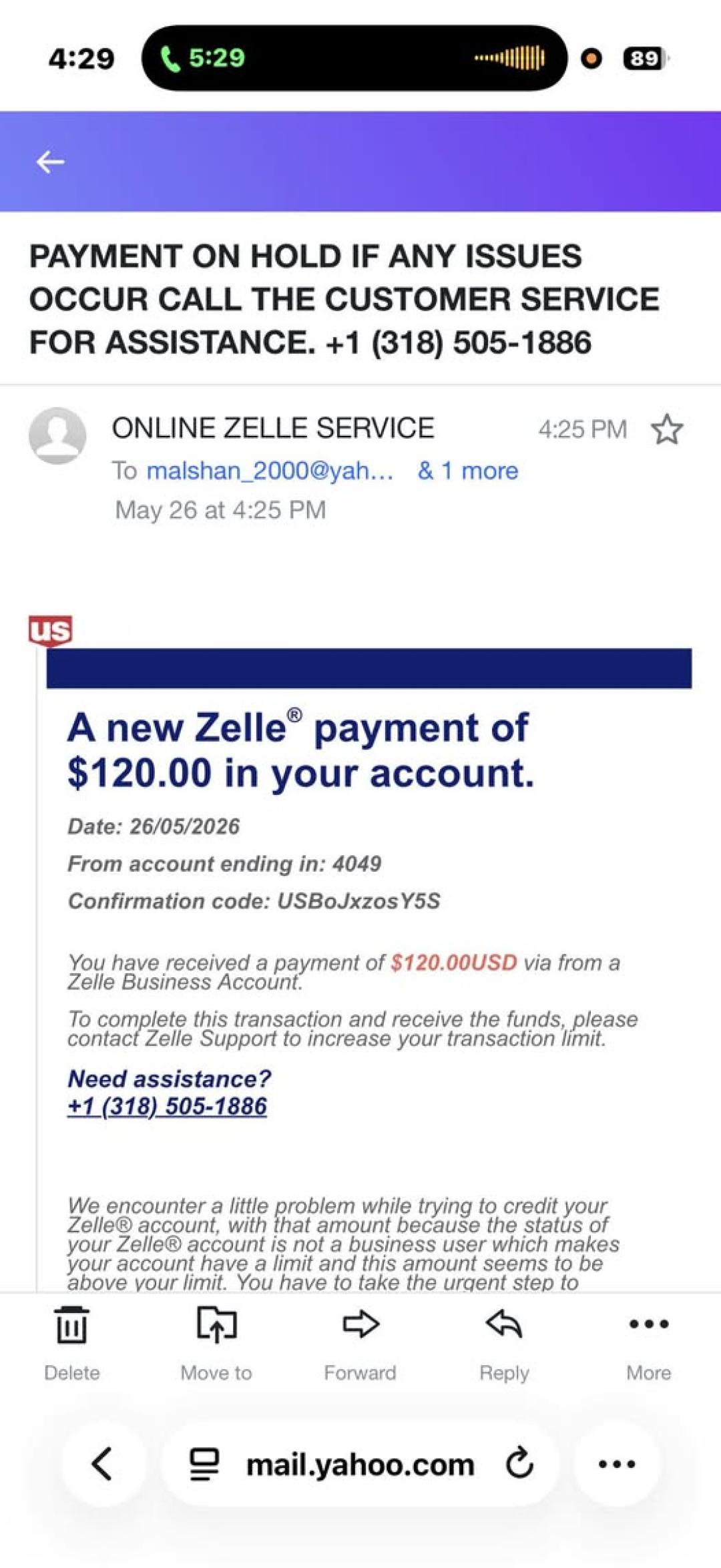
Source: Facebook
Subject: PAYMENT ON HOLD IF ANY ISSUES OCCUR CALL THE CUSTOMER SERVICE FOR ASSISTANCE. +1 (318) 505-1886
Sender: ONLINE ZELLE SERVICE
ScamAdviser Check: Scammers frequently change these telephone numbers and lookalike email domains daily. Before calling any number or replying to an alert like the one shown above, copy the details and cross-reference them on ScamAdviser.com to check for recent fraud flags, or simply log directly into your official mobile banking app to see if any real funds are pending.
Zelle transactions happen instantly, leaving no holding period for fraud review. The platform lacks the chargeback protections that come with credit cards. While Regulation E protects consumers from unauthorized transactions, victims of these scams authorize the transfers themselves — giving banks legal grounds to deny reimbursement. A 2025 report showed overall bank reimbursement rates for Zelle scam victims averaged just 47%.
Zelle explicitly designed its platform for payments between people who already know and trust each other — friends, family, and established contacts. It was not built for marketplace transactions with strangers.
Remember: Scammers do not want to buy your product. They want you to pay for the privilege of being robbed. Questioning a buyer who demands fees is not bad customer service — it is the right move.
Official Reporting Links
Frequently Asked Questions
Can I get my money back if I was scammed on Zelle?
Banks rarely refund Zelle scams because you technically authorized the transfer. You should still file a fraud claim with your bank immediately, report the incident to Zelle, and file a complaint with the FTC at ReportFraud.ftc.gov.
Does Zelle charge a fee to upgrade to a business account?
No. Zelle never charges fees to upgrade accounts or release pending payments. Any email or message claiming otherwise is a scam. Do not send money.
How do I verify if a Zelle email is real?
Log directly into your banking app to check your balance. Never click a link inside an email to verify payment. You can also paste the sender's domain into ScamAdviser.com — legitimate Zelle emails only come from @zelle.com.
What happens if I refund a Zelle overpayment?
The scammer's original payment will eventually bounce or be reversed. You will lose the real money you sent back as a refund, in addition to any goods you already shipped or services you provided.
Is Zelle safe for business transactions?
Zelle is safe only when used with people you already know and trust. It was not designed for marketplace transactions with strangers. For commercial sales to unknown buyers, use payment methods that include seller protections, such as credit cards or PayPal Goods & Services.
Adam Collins is a cybersecurity researcher at ScamAdviser who operates under a pseudonym for privacy and security. With over four years on the digital frontlines, he specialises in translating complex threats into actionable advice. His mission: exposing red flags so you can navigate the web with confidence.
